IN BRIEF:
Learn how to link customers to specific locations, or filtered lists of activities at specific locations, within the Customer Portal.
- Overview
- Finding your location IDs
- Linking to a specific location
- Linking to a predefined search at a specific location
Overview
In iClassPro, a "location" refers to a designated place where students attend activities such as classes, events, appointments, or parties. For organizations with two or more physical sites for meetings, multiple locations can be established in the system.
When multiple locations are set up within an account, iClassPro provides options to create links directing customers to a particular location or to a predefined search at a specific location (e.g., showing all classes under a certain Program or Level).
Finding your location IDs
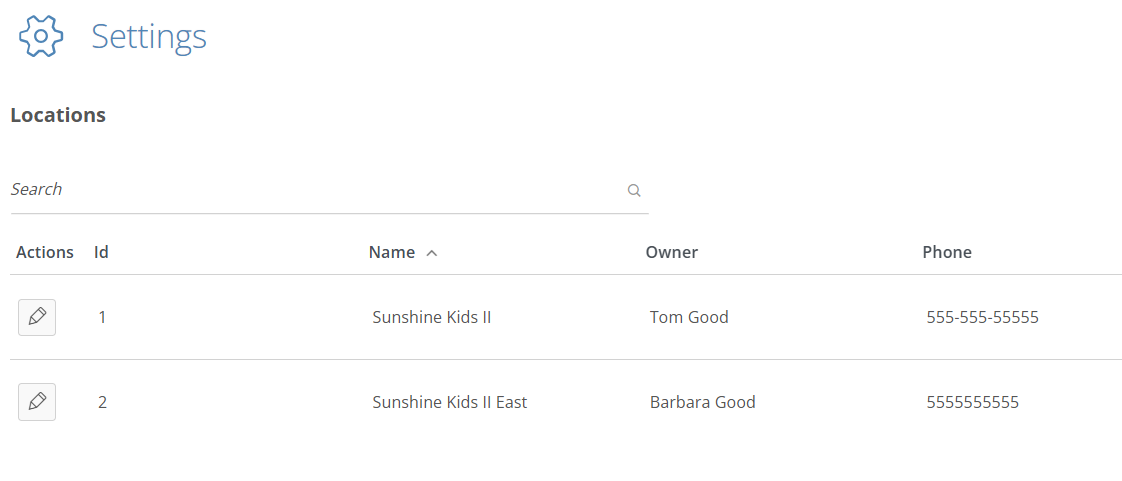
The Location ID can be found under SETTINGS>LOCATIONS:
Linking to a specific location
If you wish to link to predefined search at a specific location, you can add ?location=[location_id] to the end of your URL.
For example, if you want to link to classes at a specific location, your URL would look like this: https://portal.iclasspro.com/[account_name]/classes?location=[location_id]
- NOTE: [location_id] represents the Location ID number, and the brackets would not be included. For example: https://portal.iclasspro.com/[account_name]/classes?location=2
Linking to a predefined search at a specific location
If you are adding the location_id to a URL with an additional filter applied (such as limiting classes to show only specific Programs), you would add &location=[location_id] to the end of the URL, after the filter criteria.
For example, limiting results to classes associated with Program ID 45 would look like this: https://portal.iclasspro.com/[account_name]/classes?programs=45
To further limit the results to show only classes associated with Program ID in a specific location, the URL would look like this: https://portal.iclasspro.com/[account_name]/classes?programs=45&location=[location_id]
Expected behavior
If you link to a filtered search where the filters do not match any activities at the specified location, the system will remove the invalid filter(s) and instead will default to the main list for that activity (instead of showing that there are no matches).
For example: my business has Gymnastics classes at one location and Swim classes at another. If I filter to a Gymnastics Program at Location 1, copy the URL and then add &location=2 to the end of it (thus changing it to reference classes at Location 2 that are associated with the Gymnastics Program), the system would not find any matches. If a customer follows the link, the system would remove the invalid filter criteria and just display the main class list for Location 2.